CET212 Advanced Software Development PPW1 Task and Submission

- Details
- Category: Level 2, Advanced Software Development
- Published: Monday, 25 January 2021 15:32
- Hits: 769
Task
CET212 Advanced Software Development Assignment (2018/19)
This assignment contributes 70% to your final module mark and tests learning outcomes 2, 3 & 4.
Part A - Professional Practice Week 1
Deadline: Friday 8th March 2019, 5pm via Canvas
This assignment is split into two parts. Part A (worth 35 marks) is a design & reporting task, which will be carried out during Professional Practice Week 1 and culminates in the creation of a UML diagram and design rationale.
Part B (worth 65 marks) will be carried out during Professional Practice Week 2.
You are expected to spend around 18 hours on this part of the assignment.
Scenario
You are working as a consultant to a local authority IT department. You have been tasked with developing a C# system to manage air particulate sensor records (in micrograms per cubic metre, μg/m3) for various locations across the authority. Each set of readings for a single location will be submitted as an XML data file according to a standardised structure (see later), containing location and reading dates together with the noon particulate reading (μg/m3), temperature (in degree Celsius) and relative humidity (as a %) for each date at the location. Your system will be required to read and process the XML files for all locations of interest in order to determine total particulates for a given location, total particulates across all locations on each date and to find out which location has the largest individual particulates reading. A significant number of locations will be submitted and it is important that the authority is able to process the data quickly so that they can identify particulate hot-spots when necessary. Therefore, a multi-threaded system that can process multiple files concurrently will be required.
Ultimately, the intention is for the system to be made available as a client-server application but your task has been simplified. You are required to develop a prototype application that will run on a standalone PC but you should make use of separation of concerns so that the job of transferring the application to the local authority’s client-server environment in the future will be possible with minimum adjustments to your code.
An example XML file showing the structure of the data is provided below:
<?xml version="1.0" encoding="utf-8" ?>
<Particulates>
<Location name="Quayside">
<Reading date="18/02/2019">
<value>13</value>
<temperature>8.0</temperature>
<humidity>51.5</humidity>
</Reading>
<Reading date="19/02/2019">
<value>21</value>
<temperature>11.4</temperature>
<humidity>55.0</humidity>
</Reading>
</Location>
</Particulates>
This XML file represents the data for a location called Quayside, with a reading taken 18th February 2019 of 13 μg/m3 with temperature of 8.0oC and Humidity of 51.5% plus another reading 19th February 2019 of 21 μg/m3 with temperature of 11.4oC and Humidity of 55.0%.
The data for each location will be stored in a separate file and each location may have any number of date readings recorded, which will be on different dates in the same file.
You have been tasked with designing this application as a multi-threaded windows application, making use of the Producer/Consumer pattern and LINQ query language. You have been given the following list of functional requirements for the system:
- Select and queue the processing of multiple XML files.
- Merge the data from multiple XML files and carry out the necessary processing in order to generate the following output reports (via display on a Windows Form):
- A list of locations, with the ability to select and view details of all readings for a selected location (including the date, particulates value, temperature and humidity readings)
- A list of locations, sorted alphabetically, with the total particulates across all date readings for that location
- A list of dates, with the total recorded particulates values (across all locations), sorted by date
- The largest individual particulates value recorded by the system (the location, date and highest recorded particulates value across all amalgamated files)
Professional Practice Week 1 – Design & Reporting Task
Write a report, in either Word or PDF format, which contains the following sections:
UML Class Diagram (25 Marks)
Propose an object oriented model to solve the specified problem and document this as a UML class diagram. You should include
o data types of instance variables, parameters and method return values (when non-void)
o visibility modifiers
o parameterised constructors (where appropriate)
o relationships such as implementation and dependency.
Hand drawn UML diagrams are not acceptable. You may use a UML drawing tool e.g. Software Ideas Modeller for this task but if you do so then the UML notation used must be consistent with that covered in the module and you should export the diagram to an image file which can be embedded within the report document.
Design Rationale (10 marks)
A 200 word explanation of how you have separated your concerns.
Submission
Your submission should be provided as a single document in either Word or PDF (if you use a UML drawing tool then you MUST export it as an image and embed it in the report rather than submitting tool-specific files) and uploaded to Canvas by the specified hand-in date, using the assignment submit link provided in the assessment area.
Submission Date: Friday 8th March 2019, 5pm via Canvas.
Feedback and Marking Grid
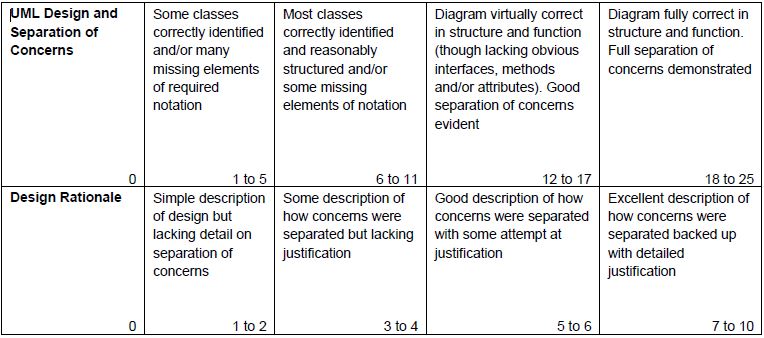
Assignment Part A (PPW1) will contribute 35 marks to the overall assignment mark.
Submission
UML Class Diagram
Design Rationale
Air Particulate Sensor
Design Rationale
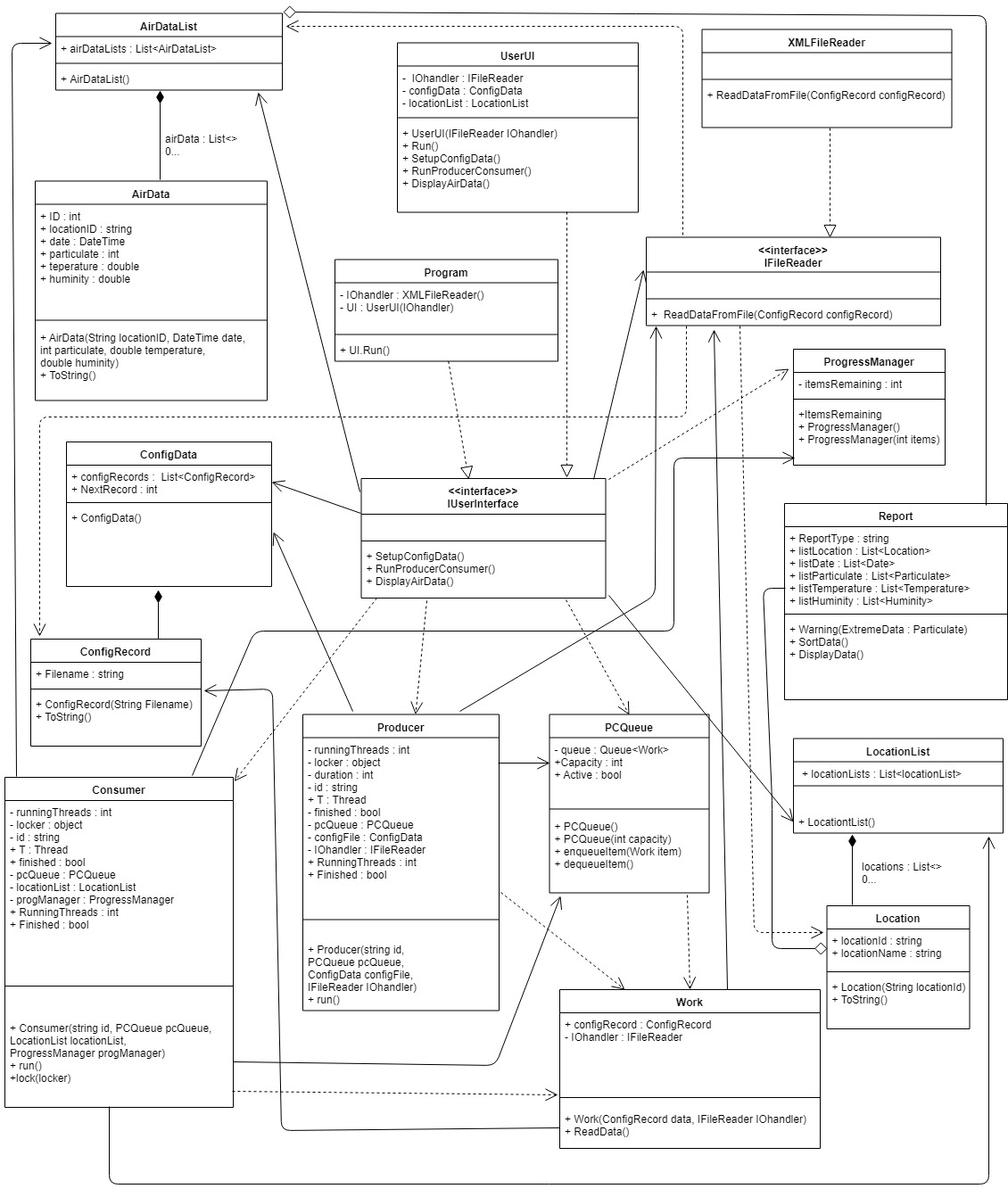
The data source is a standardised XML file what contains all necessary data. The application’s main task to read these data and display them in a report system. A lot of locations use this application and submit data files therefore multi-thread process required.
For file reading we have to create a FileReader interface which ensures connection between UserUi and processor classes. The file names handed by ConfigRecord and ConfigData classes. To held files we need insert them to a list and add them to a queue. The queue managed by PCQueue class what enqueue and dequeu items and send them to Work Class. A Producer running on its own thread and send next record to queue and manage running thread numbers. A Consumer class read data from Work thread and data to Location and AirData classes. The ProgressManager class manage renaming items. Locations and AirData stored their own object list and the common key is the locationID.
The collected data displayed in a Windows Form as a Report from AirDataList and LocationsList. We need a user interface to connect data lists to UserUI. With LINQ method easy to sort them for different type of reports.