Appendices

- Details
- Category: Level 3, CET300 Computing Project (Dissertation)
- Published: Monday, 15 February 2021 18:17
- Hits: 1161
A: Programme Route Diagram.. 55
Ethics supervisor certification and email evidence. 56
Signed Participants Consent Form.. 59
Participant Information Sheet 63
C: Project Control Documentation.. 67
Definition Brief (Without Appendices) 79
D: Analysis Documentation.. 87
Final design of the application.. 92
Number of images check test 94
G: Evaluation Documentation.. 99
Evaluation against Requirements. 99
Usability Questionnaire Form.. 100
Completed Questionnaire Form.. 103
Appendices
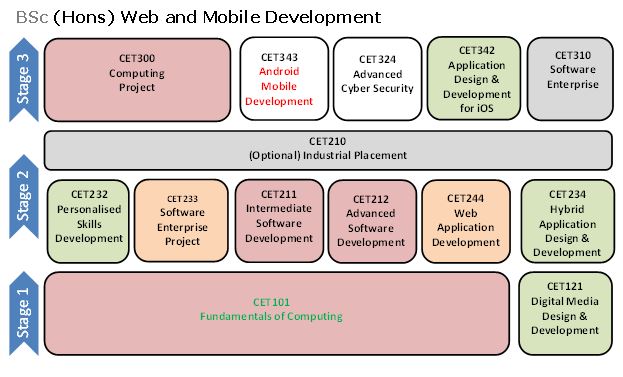
A: Programme Route Diagram
B: Ethics Documentation
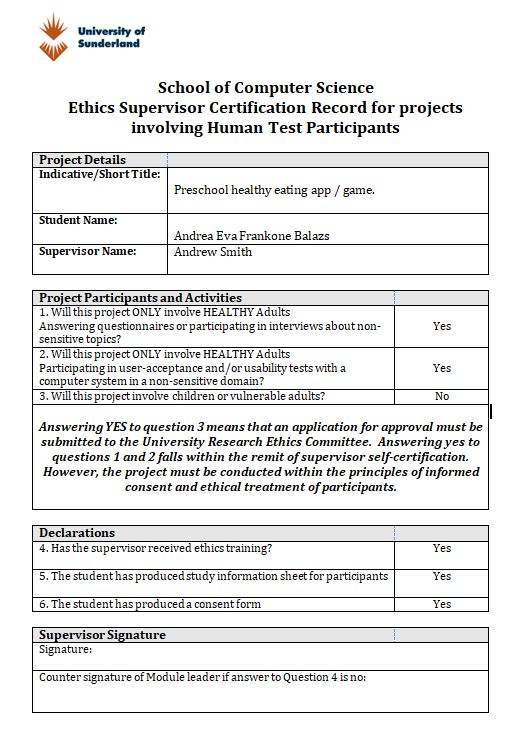
Ethics supervisor certification and email evidence


Participant Consent Form

CONSENT FORM
Study Title: Preschool healthy eating app / game.
|
|
Please initial box |
|
|
I confirm that I am over the age of 16 years. |
□ |
|
|
I have read and understood the information sheet for the above study and have had the opportunity to ask questions. |
□ |
|
|
I understand that my participation is voluntary and that I am free to withdraw at any time, without giving reason. |
□ |
|
|
I agree to take part in the above study. |
□ |
|
|
|
Please initial box |
|
|
|
Yes |
No |
|
I agree to the use of anonymised quotes in publications. |
□ |
□ |
|
I agree that my data gathered in this study may be shared (after it has been anonymised) with other researchers. |
□ |
□ |
|
I agree that my data gathered in this study may be shared (after it has been anonymised) may be used for teaching purposes. |
□ |
□ |
Name of Participant Date Signature
Name of Researcher Date Signature
Signed Participants Consent Form


Participant Information Sheet

Preschool healthy eating app / game
Participant Information Sheet
You are being invited to take part in a research study. Before you decide whether or not to take part, it is important for you to understand why the research is being done and what it will involve. Please take time to read the following information carefully.
Study Title: Preschool healthy eating app / game.
What is the purpose of the study?
The purpose of this study is to develop an Android mobile application / game that educates preschool children what items of food are healthy and what are not in an educational and fun way.
I am currently studying BSc (Hons) Web and Mobile Development at the University of Sunderland and as part of this program I need to research apps/games for Preschool children on healthy eating.
The test plan is to test the Android Mobile Application and complete the related questionnaire. The questionnaire includes questions related to the application, participants' views and suggestions. This student research takes about 30-50 minutes.
Why have I been approached?
In this research I will be using a random sampling, when choosing who to participate, this is so I will have a broader sample of participates as the population has an equal chance to be chosen.
This is so that I have results from all genders and age groups and that I have a more diverse response from my research. However, the participates will need to be 16 years old or older to be able to participate.
Do I have to take part?
Participants in this study participate entirely on a voluntary basis. It will take time to read the Participant Information Sheet, so please read carefully before deciding whether to accept or decline participation.
Ethical principles that must be taken into account during the study in order to allow participants to participate in the study require permission. This permission is obtained by having all participants read the Participant Information Sheet, which is important to understand why the research is being conducted and what it will include. This is followed by filling in the Consent Form, which is also a statement of consent to participate in the research.
Participants must agree (in writing) to participate in the research after they have been fully informed of their participation.
What will happen if I don't want to carry on with the study?
Participants may change their views without justification, without penalty, for any reason. So you can leave the study at any time.
Participants can cancel the study by contacting the appropriate person, available at the bottom of the page in Further information and contact details. Subsequently, all data collected until withdrawal should be destroyed immediately after participation in the investigation.
All data collected until revocation will be immediately destroyed.
What will happen to me if I take part?
The participant is asked to use the test version of the application with the mobile device provided and to complete a series of different tasks in succession.
Then participates will only need to answer the questions in the questionnaire these questions will be a multiple choice questionnaire so you are proved with answers to choose from. Which will be surrounding; conforming that they are 16 or older, the usability of the app, design, colour scheme, layout, ease of use, the way the game works, etc.
Testing takes place at the University of Sunderland's David Goldman Informatics Center campus and takes about 30 to 50 minutes to complete.
These tasks are purely voluntary. Volunteers do not receive any prize or compensation.
What are the possible disadvantages and risks of taking part?
There are no expected disadvantages or risks of taking part in this research.
Participants are not forced to test the application. Testing the application can only begin if the participant understands and agrees to participate. Participants will help you improve the application and solve problems found in the application.
What are the possible benefits of taking part?
Participants will help you improve the application and solve problems found in the application. Hopefully, this will result in this app being available to everyone, free of charge, and contributing to a healthy diet for children.
Besides that participation in this research will help expand and further my knowledge in what people want and are looking for, from an application or game about healthy eating for children. It will also help me complete my dissertation for University for me to be able to finish University this year.
What if something goes wrong?
If you are unhappy with the conduct of this study please contact myself Andrea Eva Frankone Balazs, my supervisor Andrew Smith or the Chair of the University of Sunderland Research Ethics Group John Fulton. Contact details are included below.
- Andrea Eva Frankone Balazs
Email: This email address is being protected from spambots. You need JavaScript enabled to view it.
- Andrew Smith (Research Supervisor)
Email: This email address is being protected from spambots. You need JavaScript enabled to view it.
Phone: 0191 515 3094
- Dr John Fulton(Chair of the University of Sunderland Research Ethics Group)
Email: This email address is being protected from spambots. You need JavaScript enabled to view it.
Phone: 0191 515 2529
How will my information be kept confidential?
All participant information (data) will be treated in accordance with the terms of the Data Protection Act (1998).
Personal information collected from participants during the study will be handled in accordance with applicable rules and regulations. The data of the completed tasks can be stored manually or digitally, which form the study. The participants' names are changed to identification numbers and these numbers are used to identify the participants and to evaluate them, not personal information. Personal data will only be accessible to study leaders and people evaluating the results. Participants' personal information is handled discreetly and personal data cannot be shared with third parties. The information will be stored in a locker, safe, password protected computer. The information is only stored until the end of the school year and then destroyed.
Participant responses will be pseudo-anonymized using participant codes and kept separately from personal identifying information. Completely anonymised data from the project may be shared with other researchers and/or used for teaching purposes.
The data may be looked at by staff authorised by the University of Sunderland for audit and quality assurance purposes.
What will happen to the results of this study?
Results will be written-up in project reports for educational qualifications, and/or may be published in academic journals, and/or presented at academic conferences.
Who is organising and funding the research?
The research is organised by Andrea Eva Frankone Balazs, who is a student at the University of Sunderland, Faculty of BSc (Hons) Web and Mobile Development, School of University of Sunderland.
This project is not externally funded.
Who has reviewed the study?
The study has been reviewed and approved by the University of Sunderland Research Ethics Group.
Further information and contact details
- Andrea Eva Frankone Balazs
Email: This email address is being protected from spambots. You need JavaScript enabled to view it.
- Andrew Smith (Research Supervisor)
Email: This email address is being protected from spambots. You need JavaScript enabled to view it.
Phone: 0191 515 3094
- Dr John Fulton(Chair of the University of Sunderland Research Ethics Group)
Email: This email address is being protected from spambots. You need JavaScript enabled to view it.
Phone: 0191 515 2529
Thank you for taking time to read the information sheet!
C: Project Control Documentation
Client Meeting and email


Schedule
CET300 Project Schedule
Name: Andrea Eva Frankone Balazs
Programme: Web and Mobile Development
Project Title: Preschool healthy eating app / game.
|
No. |
Task |
Hours |
Planned Start |
Actual Start |
Planned Finish |
Actual Finish |
Deliverable |
|
|
Planning& Control |
40/40 |
|
|
|
|
|
|
1 |
Project search |
9 |
08/10 2019 |
11/10 2019 |
13/10 2019 |
13/10 2019 |
Brief concept of beginning the project |
|
2 |
PACT |
2 |
27/10 2019 |
27/10 2019 |
27/10 2019 |
27/10 2019 |
PACT Analysis |
|
3 |
Client meeting I. |
1 |
15/10 2019 |
15/10 2019 |
15/10 2019 |
15/10 2019 |
Went over initial ideas and changed them |
|
4 |
Client meeting II. |
1 |
22/10 2019 |
22/10 2019 |
22/10 2019 |
22/10 2019 |
Went over ideas and changed them to suit the client’s needs |
|
5 |
Schedule |
|
|
|
|
|
|
|
5.1 |
Draw up Schedule |
1 |
11/10 2019 |
12/10 2019 |
23/10 2019 |
23/10 2019 |
Draft (Correlation with Supervisor ) |
|
5.2 |
Finalise Schedule |
1 |
01/11 2019 |
01/11 2019 |
01/11 2019 |
01/11 2019 |
Schedule |
|
6 |
Definitive Brief |
|
|
|
|
|
|
|
6.1 |
Introduction |
3 |
20/10 2019 |
20/10 2019 |
22/10 2019 |
25/10 2019 |
Introduction Chapter |
|
6.2 |
Context |
3 |
12/10 2019 |
12/10 2019 |
12/10 2019 |
12/10 2019 |
Context Chapter |
|
6.3 |
Research Context |
5 |
18/10 2019 |
18/10 2019 |
20/10 2019 |
20/10 2019 |
Research Chapter |
|
6.4 |
Proposed Solution |
3 |
19/10 2019 |
19/10 2019 |
21/10 2019 |
27/10 2019 |
Proposed Chapter |
|
6.5 |
Procedure |
3 |
20/10 2019 |
20/10 2019 |
22/10 2019 |
27/10 2019 |
Procedure Chapter |
|
6.6 |
Progress Report |
2 |
25/10 2019 |
25/10 2019 |
27/10 2019 |
27/10 2019 |
Progress Report Chapter |
|
6.7 |
References |
1 |
18/10 2019 |
18/10 2019 |
20/10 2019 |
20/10 2019 |
References |
|
6.8 |
Appendixes (A,B,C,D) |
5 |
25/10 2019 |
25/10 2019 |
27/10 2019 |
27/10 2019 |
Appendixes (A,B,C,D) |
|
|
Literature Review |
100/100 |
|
|
|
|
|
|
7 |
Gather Literature & Materials |
20 |
08/10 2019 |
08/10 2019 |
20/10 2019 |
20/10 2019 |
Bank of Research Materials |
|
7.1 |
Read Literature & Materials |
5 |
08/10 2019 |
08/10 2019 |
20/10 2019 |
20/10 2019 |
Read Literature & Materials |
|
7.2 |
Draft Chapters |
20 |
11/11 2019 |
11/11 2019 |
10/12 2019 |
12/12 2019 |
Draft Research Chapters |
|
7.3 |
Research Chapters |
50 |
07/11 2019 |
07/11 2019 |
08/12 2019 |
12/12 2019 |
Research Chapters |
|
7.4 |
Finalise Chapters |
5 |
09/12 2019 |
09/12 2019 |
10/12 2019 |
13/12 2019 |
Literature Review |
|
|
Analysis & Design |
60/60 |
|
|
|
|
|
|
8 |
Researches |
8 |
08/12 2019 |
13/12 2019 |
10/12 201913 |
17/12 2019 |
Analysis Documentation |
|
8.1 |
Developer tools |
6 |
12/12 2019 |
17/12 2019 |
13/12 2019 |
18/12 2019 |
Source code |
|
8.2 |
Usability of games |
3 |
13/12 2019 |
02/01 2020 |
15/12 2019 |
04/01 2020 |
Usable games |
|
8.3 |
Draft Chapter 3. |
15 |
20/12 2019 |
02/01 2020 |
13/01 2020 |
18/01 2020 |
Draft Analysis Chapter |
|
9 |
Design |
|
|
|
|
|
Design Documentation |
|
9.1 |
Low Fidelity GUI Design |
1 |
22/10 2019 |
22/10 2019 |
22/10 2019 |
22/10 2019 |
Low Fidelity GUI Design |
|
9.2 |
Function Design |
2 |
17/12 2019 |
04/01 2020 |
18/12 2019 |
07/01 2020 |
Program Function Structure Documentation |
|
9.3 |
Prototyping |
10 |
18/12 2019 |
05/01 2020 |
18/01 2020 |
18/02 2020 |
Prototypes |
|
9.4 |
Draft Chapter 4. |
15 |
27/12 2019 |
20/01 2020 |
08/01 2020 |
23/01 2020 |
Draft Design Chapter |
|
10 |
Development |
100/100 |
|
|
|
|
|
|
10.1 |
Create main page |
15 |
06/01 2020 |
08/01 2020 |
12/01 2019 |
16/01 2020 |
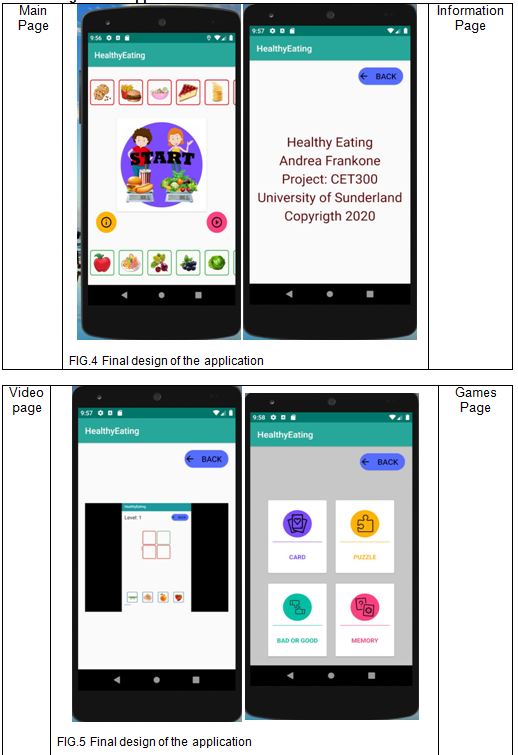
Main page |
|
10.2 |
Create Video Page |
4 |
13/01 2020 |
17/01 2020 |
15/01 2020 |
19/01 2020 |
Video page |
|
10.3 |
Create Information page |
3 |
16/01 2020 |
20/01 2020 |
18/01 2020 |
22/01 2020 |
Information page |
|
10.4 |
Create Card Game |
22 |
20/01 2020 |
23/01 2020 |
26/01 2020 |
01/02 2020 |
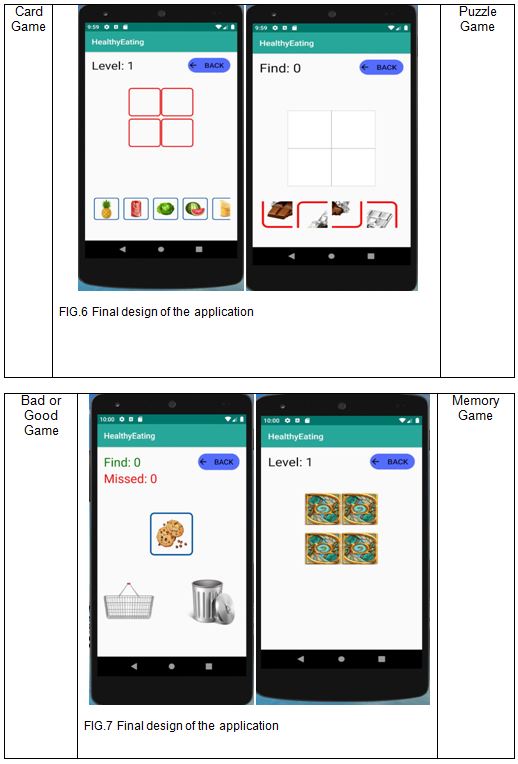
Card Game |
|
10.5 |
Create Puzzle Game |
26 |
27/01 2020 |
03/02 2020 |
02/02 2020 |
12/02 2020 |
Puzzle Game |
|
10.6 |
Create Bad or Good Game |
15 |
03/02 2020 |
13/02 2020 |
09/02 2020 |
22/02 2020 |
Bad or Good Game |
|
10.7 |
Create Memory Game |
15 |
10/02 2020 |
23/02 2020 |
16/02 2020 |
28/02 2020 |
Memory Game |
|
11 |
Testing |
30/30 |
|
|
|
|
|
|
11.1 |
Alpha testing |
9 |
Feb 2020 |
02/03 2020 |
Feb 2020 |
08/03 2020 |
Test documentation |
|
11.2 |
Beta testing |
5 |
Feb 2020 |
23/03 2020 |
Feb 2020 |
26/03 2020 |
Test documentation |
|
11.3 |
Test user inputs |
8 |
Feb 2020 |
28/03 2020 |
Feb 2020 |
28/03 2020 |
Test documentation |
|
11.4 |
Test outputs |
8 |
Feb 2020 |
31/03 2020 |
Feb 2020 |
31/03 2020 |
Test documentation |
|
12 |
Evaluation |
0/30 |
|
|
|
|
|
|
|
Evaluate impact of literature on development |
10 |
Marc 2020 |
01/04 2020 |
Marc 2020 |
03/04 2020 |
Evaluation documentation |
|
|
Evaluate prototypes with client |
8 |
Marc 2020 |
04/04 2020 |
Marc 2020 |
06/04 2020 |
Evaluation documentation |
|
|
Evaluate system with end users |
7 |
Marc 2020 |
07/04 2020 |
Marc 2020 |
09/04 2020 |
Evaluation documentation |
|
|
Self Evaluate |
5 |
Marc 2020 |
10/04 2020 |
Marc 2020 |
12/04 2020 |
Evaluation documentation |
|
|
Documentation |
40/40 |
|
|
|
|
|
|
18 |
Create Table of Contents, Cover page and headings |
1 |
Marc 2020 |
13/04 2020 |
April 2020 |
13/04 2020 |
Table of Contents, Cover page and headings |
|
19 |
Finalise Introduction Chapter 1
|
4 |
Marc 2020 |
14/04 2020 |
April 2020 |
15/04 2020 |
Introduction Chapter |
|
20 |
Finalise Literature Review Chapter 2 |
5 |
Marc 2020 |
16/04 2020 |
April 2020 |
17/04 2020 |
Literature Review Chapter |
|
21 |
Finalise Analysis Chapter 3 |
4 |
Marc 2020 |
18/04 2020 |
April 2020 |
19/04 2020 |
Analysis Chapter |
|
22 |
Finalise Design Chapter 4 |
4 |
Marc 2020 |
20/04 2020 |
April 2020 |
21/04 2020 |
Design Chapter |
|
23 |
Finalise Development Chapter 5 |
5 |
Marc 2020 |
22/04 2020 |
April 2020 |
23/04 2020 |
Development Chapter |
|
24 |
Finalise Testing Chapter 6 |
4 |
Marc 2020 |
24/04 2020 |
April 2020 |
25/04 2020 |
Testing Chapter |
|
|
Finalise Evaluation Chapter 7 |
4 |
Marc 2020 |
26/04 2020 |
April 2020 |
26/04 2020 |
Evaluation Chapter |
|
|
Finalise Conclusions and Future Recommendation Chapter 8 |
3 |
Marc 2020 |
27/04 2020 |
April 2020 |
27/04 2020 |
Conclusions and Future Recommendation Chapter |
|
25 |
Finalise References |
2 |
Marc 2020 |
28/04 2020 |
April 2020 |
28/04 2020 |
References |
|
26 |
Finalise Appendices |
2 |
Marc 2020 |
29/04 2020 |
April 2020 |
29/04 2020 |
Appendices |
|
27 |
Submit dissertation |
2 |
April 2020 |
08/05 2020 |
April 2020 |
08/05 2020 |
Final dissertation submitted |
|
|
TOTAL HOURS |
400 |
|
|
|
|
|
Definition Brief (Without Appendices)
The CET300 Project which this document will be defined for is “Preschool Healthy Eating App”. The project itself is a client-based project commissioned by Mr David Grey from the Sunderland of University.
This document will consist of various chapters starting with this introductory section. The context of this project will be scoped in Section 2 of this document. This is where the context of Mr Grey, the client, was introduced in more detail, what was request or the job that needed to be done. The potential problems with the project were also discussed.
Section 3, the research context this is where the problems in section 2 were discussed and researched to find a solution to the problems, to find out more about the topic of the project to have more understanding around the area of the topic.
Section 4, the Proposed Solution, this outlines why using the Android operating system, Java language, what functions are required for the application. This section will be split into numerous sub sections, breaking down into features such as Functional Requirements it describes the functions software must perform. The Non-functional requirements tell you how the system will run or work properly. The hardware and software needs and Constraints.
Section 5, of the project is going to be covering the Procedures of the project, 5.1 outlines the potential Social, Ethical, Legal and Professional issues (SEPL) that the application could contain, Potential Social issue could be that the parents view the application as ineffective, Ethical issue surrounding this application could be data protection, there are no potential Professional issues, Legal issue about have to be a CRB check. The 5.2 which will be covering which the Software Engineering Methodology use Agile during this project, with subsequent reasoning as to why.
Section 6, Progress Report the written part of the document details what has been carried out so far as part of my project week by week, as well as outlining particular documentation that has been completed so far, that needs to be put in the appendices and the date should also indicate when the activity occurred.
This section is including of References and four Appendix Sections too. The References which have been made in a Harvard format which have been cited throughout this document. The appendix section includes My Program Path, My Project Schedule, Customer Meetings, and Made Analysis and Planning Diagrams.
- Context
The title for this project is “Preschool Healthy Eating App”. The project itself has been requested by Mr David Grey from the Sunderland of University. Mr David Grey Senior Lecturer in Computer Science and a previous graduate from the University of Sunderland. He teaches core modules which are delivered across the full suite of undergraduate computing courses including: Fundamentals of Computing, Android Mobile Development. Grey, D. (2019)
Mr David Gray is concerned about the reason why children are overweight at a young age. Overweight can be caused by malnutrition, poor physical activity, and inadequate education for a healthy lifestyle. This problem led me to somehow find a solution. Therefore, the objective is to prevent obesity in young children.
Since Mr David Gray is interested in website design and development, he focuses primarily on mobile first approaches, application development, programming, user experience design, HCI and website security. He has come to rely on me to make an application which he wants to promote healthy eating. Primarily targeting a young generation of kindergarteners. Because it is important that healthy nutrition is learned at a young age to prevent obesity in children.
Today’s generation has matured to deviate from our traditional educational habits as teaching children using books. With the development of today’s technology, the use of mobile applications has become available to all families and a part of our everyday lives. Recognizing the current situation, educating children about healthy eating is ripe for a rejuvenating intervention. Today’s technology allows us to train the next generation with mobile phone applications.
Taking advantage of this opportunity, this app focuses on how to teach preschoolers about healthy eating. Many educational applications are complex and very complex for children. To improve this situation, the goal is to create an app that takes children’s needs into account and focuses only on healthy eating. It is important to draw children’s attention in a playful way and make the app simple to be user-friendly for children. The design of a child-friendly user interface will be done with consideration such as using colours, icons and sounds.
This project will produce an application that will have the following: Game with levels to teach preschool children what food is healthy and what isn’t. Area to show children the effects of healthy / unhealthy eating in a way they will understand and is suitable. In the long term, Mr David Grey is hoping this application will help Preschool children in the future learn what food is healthy and what isn’t and they will understand the effects of healthy / unhealthy eating in a way.
Achieving the goal, the end result of which is the creation of an application that can reduce the obesity of preschool children.
This application has caused many problems. Starting with how to educate preschoolers on healthy eating as this age group cannot read yet. It is enough to focus solely on healthy eating or to promote physical activity for a healthy lifestyle.
It is important to supplement this with a healthy diet, e.g. the importance of washing hands, brushing your teeth, or just strictly what items of food are healthy and what are not. They are mature enough to use a mobile application. Kids can use mobile devices anywhere, anytime during the day. When in which mode they will access the application. Finally, the effectiveness of the use of applications for children under 5 will need to be taken into consideration.
Children typically do not use a device due to battery life. You need to make sure that application data can be accessed from multiple devices simultaneously. Utilize the visual and audio capabilities of mobile devices. Can the built-in sensors be used, motion, light sensors or photos. Networking, Internet connectivity, multi-device deployment, messaging, etc.
Healthy nutrition for preschool children
The first topic is about healthy nutrition for preschool children. This project is important because the application should educate preschoolers on the essence of healthy eating for educational purposes.
The J.D.Lanigan Department of Human Development wrote an article. Surrounding the significantly increasing obesity among young children. To solve this problem, it may be helpful to utilize the experience of children in various ways in the development of healthy weight. The method examines knowledge about healthy eating and exercise among American kindergarten children. He studied children aged 81.3-5 with different socio-economic and ethnic backgrounds. As a result, children understood the benefits of a healthy diet and exercise. In healthy eating practices, the children had to feed their baby healthily for approx. 40% (n = 32) chose healthy food for baby's breakfast and 33% for lunch. This proportion was lower than the selection of healthy non-mainstream healthy foods and beverages at 8% and 19% respectively. The vast majority of Children did little active physical activity. In general health understandings, 17 children were examined to see what they had done to maintain a healthy lifestyle. About 41% (n = 7) listed their diet-related methods to avoid drinking water, vegetables, and unhealthy foods. Eight children (47%) reported physical activity. Conclusion It is important to educate young children on healthy eating and exercise to prevent obesity. The most important drawbacks for children are the importance of drinking water, healthy food and exercise. Lanigan, J. D. (2011)
In summary, the children understood the benefits of a healthy diet and exercise. At the same time, only 40% of children make healthy choices. This percentage could be greatly increased and therefore plays an important role in educating children on a healthy lifestyle. As with nutrition and with physical activity. It is not enough to focus solely on healthy eating for a healthy lifestyle, as a combination of eating and exercising can lead to a healthy lifestyle. Attention should be paid to healthy ingredients such as protein, dairy, fruits, vegetables and carbohydrates. They need to understand which group of ingredients they belong to and why they are important for maintaining a healthy lifestyle. Physical activity also needs to be taught and explained why it is important for children that it affects both mental and physical activity.
Using the application for children under 5 and its effects
Subsequent topic using the application for children under 5 and its effects. This topic is important to the project because it has raised some questions about the impact of preschoolers on educational applications, such as promoting or hindering their development. It begs the question, if educating a child on a healthy lifestyle with an application, that does not have the negative effect of, for example, moving less or impairing motor skills, which is important to them at this age for development. The goal would be to educate them on a healthier life with this application.
The essence of this article is that children do not consume enough fruits and vegetables so they have developed a vegetable based mathematical game based on the principles of modelling and rewarding. The purpose of this study was to evaluate the effectiveness of an evidence-based mobile application to help children learn about, and appreciate fruits and vegetables and thus increase their fruit and vegetable intake. Children aged 3-6 years played with this application and after 10 minutes of play they became more interested in the application and also experienced an increase in the children's intake of vegetables. This was explained by the fact that the children were playing with this application. 74 children (37 boys, 37 girls) aged 3-6 were randomized to play with two different applications, one of which was vegetables and the other was a simple application. Kids who played with the Vegetable Maths Masters application increased their vegetable intake and favoured vegetables. The two groups did not find much difference in baseline measurement, but after playing the Vegetable Maths Masters app, the kids consumed 9.71g more vegetables than the other group, down 2.21g after 10 minutes of play. These results suggest that mobile apps can be an effective tool for increasing short-term vegetable consumption among children. Farrow, C. et al. (2019)
All in all, mobile application games are popular with children and thus provide an educational opportunity to educate children in this way. Because they are very receptive to the processing of new information, it is easier to teach children the right healthy nutrition with an application. In other areas, it can also be useful for education, such as physical activity, the benefits of brushing, and brushing, which may be associated with a healthy lifestyle. So, a healthy eating app can help young kids learn to play the important elements of healthy eating playfully. Such as healthy food groups, vegetable and fruit concepts. Hopefully, with an application, they can easily and quickly lead them to good nutrition and the things they need to maintain a healthy lifestyle for educational purposes.
Voice or sound based learning
Preschool children are yet to learn to be able to read or write, which creates issues when planning to make an application on teaching children healthy eating. This research is important for my project and research also because, it will help to understand and see how it can be implemented into making a educational application or mobile game for children. There are other ways and techniques to educating young children including; voice or sound based learning, shape and colour based learning. Which are the following points that will be discussed.
Firstly, this is an academic article, where a voice and gesture-based interactive virtual learning environment program was used to assess the advantages of the given proposition compared to the conventional approach to learning which is classroom based. In this research the children and the preschool teacher’s used a virtual application or program which focused on the progression of communication skills in the children. The program was used by the teachers as a teaching tool in lessons, it taught the children words, colours, shapes, etc. Which were selected by the teacher. Subsequently, the thirty-two teachers had to do assessments, a physical games assessment and a virtual game assessment to evaluate the effectiveness and how the games influenced the children’s learning.
Finally, the conclusion of the research and experiment showed that the voice and gesture element of the games engaged and continued to engage the children into learning. The game helped improve the learning implementation of the children in terms of language and communication. Furthermore, the children needed the games not only to be educational and informative but to be entertaining and fun so the children are continuously active in the work. Lai, N. K. et al. (2018)
In conclusion, when making an application for young children like preschoolers it is important to include and involve sound. To highlight and make shapes and colours stand out, to be able to perpetually keep the attention of the children focused on the application or the game itself.
Rules, policies and restrictions
When creating applications or games the rules, policies and restrictions have to be taken into consideration before the development of the application. When producing a game for younger children the parents have to be taken into account because, most likely it is their devices that the children will be using. For example age restrictions, game content/description, agreement to game, access to email and accounts, etc.
Firstly, this information was collected from a government website. The government along with other companies and organisations have collaborated to be ensuring that young children are only able to access safe material that is appropriate for their ages.
There are also age restriction laws, where the age rating of the game has to be displayed and be visible. Video game publishers have also embraced a new system of new classifications and product labelling requirements. In addition, these new rules and policies also include anyone under the age of 12 purchasing a 12 age rated game, is now a criminal offence. Vaizer, E. (2012)
In conclusion, the application description and advertisement will need to be more appealing to parents but also needs to appeal to children. However, the description of the game will have to be aimed towards the parents as it will be their accounts and devices that the application will be installed onto and used one. The age rating of the game will also have to be clearly stated.
The Android operating system will be used when creating this application, as it is free to create an application using the Android operating system, while the IOS operating system you have to pay to be able to use or create an application. Android is also a lot more flexible to work with. In addition, most developers, around 70%, prefer and use Android over IOS. Smt. Annapurna . (2016).
The application will also require functions, such as sound as children between two and five years are yet to be able to read and write so sound is the best way to educate young children. Another function would be to use basic shapes and colours for children to understand and also to use some words along with the sound as some five year old children are just beginning to learn to read and be taught basic words.
The chosen programming language will need to be decided upon which the best is for the purpose and one that allows for later development. The chosen programming language is Android Studio Java, as it is the most widely used; it is then also easy to convert it to another platform or website.
- Tutorial/hints to educate
- Access to Wi-Fi to download the application
- Simple menu system
- Multiple games to educate on healthy food choices
So as users can learn the healthy and unhealthy elements with the Tutorial feature, which can be useful before starting the game. Moving images will be distinguished by different colours which, when clicked, will give you feedback on whether that item is healthy or unhealthy.
Various games will be equipped with features such as grabbing and pasting images, difficulty levels, scoring system, feedback with wrong and good choices with icons and sound.
4.2 Non-Functional Requirements
- Access to internet connection
- Easy Accessibility
- Audio and Visual features
- Graphical elements for easy usability
- Limited text messages
4.3 Resources
- Open source image gallery of different foods
- Icon Collection for navigation and buttons
- Sound collection for food names and other functions
4.4 Hardware & Software Requirements
- Any Android device version API 23 compatible
- Touch screen
- Audio
- Language- Java
- Wi-Fi or mobile internet/broadband connection
- Slideshow
- Target user cannot read
- Target user cannot write
- Screen sizes
- User unable to register
- Cannot include complicated graphics or menus
- All functions of the device have to be adapted to those of young children
- Procedure
5.1 SEPLi
Social
A potential social issue could be that the parents view the application as ineffective because instead of encouraging them to go outside and exercise, it encourages them to sit on mobile devices instead. Another would be that it will potentially damage their eyesight after looking at a screen for long periods of time, not getting proper amounts of sleep because they are on the device and application for too long.
Ethical
An ethical issue surrounding this application could be data protection, the security of the system and the personal information of the user. However, this app will not need any personal information from the user; it will not require any sensitive information from the user to be able to run the system. This application doesn’t require any sensitive or personal information as the target audience are very young and wouldn’t be able to give any of their details anyway.
Professional
There are no potential professional issues as there is no personal information or sensitive information that needs to be saved and stored from the user. There will also be care taken when selecting images or referencing any work, to make sure that there will be no copyright issues.
Legal
A legal issue about the application is that the application is designed for two to five year olds, seeing as they are fewer than 16 years old, there will either have to be a CRB check done or submit the application to the University ethics committee.
The software development methodology that will be implemented is the Agile software development cycle. This was the choice of methodology as communication between the client and the development or project team is of high importance, the client is a key part in the developmental part of project. This methodology also leaves room for changes to be made and implemented into the application or design. This methodology also has a lot of focus on the user’s needs, so the user is always kept in mind, throughout the development of the application.
Farrow, C. et al. (2019) ‘Using repeated visual exposure, rewards and modelling in a mobile application to increase vegetable acceptance in children’, Appetite, 141. doi: 10.1016/j.appet.2019.104327.
Grey, D. (2019). David Grey. [online] University of Sunderland. Available at: https://www.sunderland.ac.uk/about/staff/computing/davidgrey-1/ [Accessed 16 Oct. 2019].
Lai, N. K. et al. (2018) ‘Learning through intuitive interface: A case study on preschool learning’, Computers & Education, 126, pp. 443–458. doi: 10.1016/j.compedu.2018.08.015.
Lanigan, J. D. (2011) ‘The substance and sources of young children’s healthy eating and physical activity knowledge: implications for obesity prevention efforts’, Child: Care, Health & Development, 37(3), pp. 368–376. doi: 10.1111/j.1365-2214.2010.01191.x.
Smt. Annapurna. (2016). A Comparative Study on Mobile Platforms (Android vs. IOS). Available: http://ijarcet.org/wp-content/uploads/IJARCET-VOL-5-ISSUE-3-547-553.pdf Last accessed 21 october 2019.
Vaizer, E. (2012). New rules to better protect children from inappropriate video game content. [online] GOV.UK. Available at: https://www.gov.uk/government/news/new-rules-to-better-protect-children-from-inappropriate-video-game-content [Accessed 27 Jul. 2012].
D: Analysis Documentation
Project Proposal
|
Project Title: |
|
|
Academic Area:
|
(Select from: Games Software Development / Computer Science / Intelligent Systems / Multimedia / Computer Forensics/ Secure Systems Design / Information Systems / Software Engineering / Internet or Network Technologies / User Experience Design)
|
|
Project Description: client details,
current context/ situation/ problem,
proposal for problem solution (client may propose an idea. Student should suggest and negotiate final solution to be implemented)
|
Mr David Grey This email address is being protected from spambots. You need JavaScript enabled to view it.
Preschool healthy eating app / game.
An app / game that teaches preschool children what items of food are healthy and what are not in an educational and fun way.
|
|
Specific Requirements: (e.g. programming language or environment; specialised equipment needed etc.)
|
A suitable programming environment to produce a native app. |
|
Practical Outcome: (e.g. “The project will produce an ‘X’ type of system, whose functionality will be a, b, c…”)
Note - the client may or may not have an opinion about this.
It is the student’s responsibility to propose a solution with which the client agrees.
|
The project will produce an app that will have the following functionality:
Game with levels to teach preschool children what food is healthy and what isn’t. Area to show children the effects of healthy / unhealthy eating in a way they will understand and is suitable. |
|
Research Focus: (Topic of literature review that will help inform the product development) |
Healthy eating in young children Effect of use of apps for children under 5.
|
|
Preliminary Reading List: (5 background articles/key texts/seminal research publications to kick start the project) |
.
.
.
.
.
|
|
Ethical Considerations: (e.g. if the project involves working with vulnerable people/children students will need a police/disclosure check (DBS) be undertaken.) |
Working with children |
|
Additional Info: (e.g. can more than one student attempt the project?) |
Yes. One project for Android development and One project for iOS. |
|
Client/Sponsor Details: |
Name: Mr David Grey Contact Details: This email address is being protected from spambots. You need JavaScript enabled to view it.
Signature: D.Grey Date: 12/09/2018
|
|
Student Signature: |
Signature: Date:
|
|
Module Leader Signature: |
Signature: Date: |
PACT
PACT (People, Activities, Contexts, Technologies) Summary
Product Name: Healthy eating Mobile Application for Preschool children
|
People Who do you think are the key users of this product? Think about the broad user groups that can be identified. List these groups and their likely characteristics in order of priority for the product in question. Not general considerations for building any system, but specific considerations for designingyouruser-system interactions Any characteristics that could affect your interface design? Are the users homogenous/heterogeneous? (physical, cognitive, usage pattern differences) |
PACT Summary • Preschool children - 2-5 years old - Who is interested Healthy eating · Preschool children have experience of web system · Preschool children have experience use of mobile phone or tablet. |
|
Activities What are the main goals/tasks users will want to achieve with this product? Again, list these in order of priority (e.g. if the system has a log in it is likely that a user would create an account just once therefore that task should be bottom of the list).
|
· Games o Choose from 4 games · About o Video about games and how it works · Tutorial o Teaching playfully |
|
Contexts Where will this product be used? Describe the likely environment, physical, organisational &social,and discuss the implications of this (e.g. the product’s resilience to the environmental factors such as noise, disturbance, light, ability to connect to wifi if out and about, cooperation with others - single or multiple person interaction etc.)
|
· At home · In school environment · Needs internet connection regardless · No issues of shared use · No issues of time constraint · The colours are attracting attention but they are not confusing · The sound are attracting attention but they are not confusing does not bother visiting people |
|
Technologies What type of technology will the users have? Consider input and output, data types etc. test, speech, icons, error messages etc. You should link to what you have said in the contexts section above. You should also link to what you have said in the activities section above (e.g. if an activity is to leave comments then the input technology might be a form; if the activity is to search then the input technology might be a search bar). |
· Mobile/tablet interface · Access to internet · Easy to use · Non-distracting colours · Clear but not distracting sounds · Clearly interpretable pictures |
|
Business Goals: What are the product’s primary business goals?
The primary goals of this project are to be able to teach children between the ages of two to five, healthy eating and nutrition through a playful and game-like application.
|
|
First planning design

Fig.1 First planning design

Fig.2 First planning design

Fig.3 First planning design
Final design of the application
F: Test Documentation
Screen Size Determine Test

Fig.8 Screen Size Determine Test

Fig.9 Screen Size Determine Test

Fig.10 Screen Size Determine Test
Number of images check test

Fig.11 Number of images check test

Fig.12 Number of images check test

Fig.13 Number of images check test
Long Click Test

Fig.14 Long Click Test
Drag Event Test
Fig.15 Drag Event Test

Fig.16 Drag Event Test

Fig.17 Drag Event Test
Basket or Bin Test

Fig. 18 Basket or Bin Test

Fig. 19 Basket or Bin Test

Fig. 20 Basket or Bin Test
Alpha Testing
|
Test ID |
Function |
Access from |
Expected Result |
Pass / fail |
|
1 |
Slider (scroll view) |
movable |
movable left and right |
P |
|
2 |
image |
click on the image |
voice says it's healthy/unhealthy and food name |
P |
|
3 |
Information icon |
Information Info |
Displayed info |
P |
|
4 |
Video icon |
Video page |
play the video |
P |
|
5 |
Start icon |
Games page |
shows the optional games: Card, Puzzle, Bad or Good and Memory |
P |
|
6 |
Card Game |
Level1, Level2, Level3 |
Play a game and show the result/ going to the next level |
P |
|
7 |
Card Game images |
paste the image in the right place |
points the score and prints |
P |
|
8 |
Card Game images |
paste the image in the wrong place |
did not score or print the result |
P |
|
9 |
Card Game End |
Level1, Level2, Level3 |
Exit/start a new game |
P |
|
10 |
Puzzle Game |
Level1, Level2, Level3 |
Play a game and show the result/ going to the next level |
P |
|
11 |
Puzzle Game images |
paste the image in the right place |
points the score and prints |
P |
|
12 |
Puzzle Game images |
paste the image in the wrong place |
did not score or print the result |
P |
|
13 |
Puzzle Game End |
Level1, Level2, Level3 |
Exit/start a new game |
P |
|
14 |
Bad or Good Game |
Level1, Level2, Level3 |
Play a game and show the result/ going to the next level |
P |
|
15 |
Bad or Good Game images |
paste the image in the right place |
points the score and prints |
P |
|
16 |
Bad or Good Game images |
paste the image in the wrong place |
points the score and prints |
P |
|
17 |
Bad or Good Game End |
Level1, Level2, Level3 |
Exit/start a new game |
P |
|
18 |
Memory Game |
Level1, Level2, Level3 |
Play a game and show the result/ going to the next level |
P |
|
19 |
Memory Game card |
the card paired |
points the score and prints/cards disappear and not visible |
P |
|
20 |
Memory Game card |
The card is not paired |
did not score or print the result/ cards not disappear and visible |
P |
|
21 |
Memory Game End |
Level1, Level2, Level3 |
Exit/start a new game |
P |
|
22 |
Back Button |
Information page Video page Games page |
returns to the main page |
P |
|
23 |
Back Button |
Card Game page Puzzle Game page Bad or Good Game page Memory Game page |
returns to the games page |
P |
Table.1 Alpha Testing
Beta Testing
|
Test ID |
Function |
Access from |
Expected Result |
Pass / fail |
|
1 |
Slider (scroll view) |
movable |
movable left and right |
P |
|
2 |
image |
click on the image |
voice says it's healthy/unhealthy and food name |
P |
|
3 |
Information icon |
Information Info |
Displayed info |
P |
|
4 |
Video icon |
Video page |
play the video |
P |
|
5 |
Start icon |
Games page |
shows the optional games: Card, Puzzle, Bad or Good and Memory |
P |
|
6 |
Card Game |
Level1, Level2, Level3 |
Play a game and show the result/ going to the next level |
P |
|
7 |
Card Game images |
paste the image in the right place |
points the score and prints |
P |
|
8 |
Card Game images |
paste the image in the wrong place |
did not score or print the result |
P |
|
9 |
Card Game End |
Level1, Level2, Level3 |
Exit/start a new game |
P |
|
10 |
Puzzle Game |
Level1, Level2, Level3 |
Play a game and show the result/ going to the next level |
P |
|
11 |
Puzzle Game images |
paste the image in the right place |
points the score and prints |
P |
|
12 |
Puzzle Game images |
paste the image in the wrong place |
did not score or print the result |
P |
|
13 |
Puzzle Game End |
Level1, Level2, Level3 |
Exit/start a new game |
P |
|
14 |
Bad or Good Game |
Level1, Level2, Level3 |
Play a game and show the result/ going to the next level |
P |
|
15 |
Bad or Good Game images |
paste the image in the right place |
points the score and prints |
P |
|
16 |
Bad or Good Game images |
paste the image in the wrong place |
points the score and prints |
P |
|
17 |
Bad or Good Game End |
Level1, Level2, Level3 |
Exit/start a new game |
P |
|
18 |
Memory Game |
Level1, Level2, Level3 |
Play a game and show the result/ going to the next level |
P |
|
19 |
Memory Game card |
the card paired |
points the score and prints/cards disappear and not visible |
P |
|
20 |
Memory Game card |
The card is not paired |
did not score or print the result/ cards not disappear and visible |
P |
|
21 |
Memory Game End |
Level1, Level2, Level3 |
Exit/start a new game |
P |
|
22 |
Back Button |
Information page Video page Games page |
returns to the main page |
P |
|
23 |
Back Button |
Card Game page Puzzle Game page Bad or Good Game page Memory Game page |
returns to the games page |
P |
|
24 |
Slider (scroll view) |
movable |
movable left and right |
P |
|
25 |
image |
click on the image |
voice says it's healthy/unhealthy and food name |
P |
|
26 |
Information icon |
Information Info |
Displayed info |
P |
|
27 |
Video icon |
Video page |
play the video |
P |
|
28 |
Start icon |
Games page |
shows the optional games: Card, Puzzle, Bad or Good and Memory |
P |
|
29 |
Card Game |
Level1, Level2, Level3 |
Play a game and show the result/ going to the next level |
P |
|
30 |
Card Game images |
paste the image in the right place |
points the score and prints |
P |
Table.2 Beta Testing
G: Evaluation Documentation
Evaluation against Requirements
|
Requirement |
Title |
Type |
Status |
|
RF-1 |
Different games |
Functional |
Complete |
|
RF-2 |
Different game levels |
Functional |
Complete |
|
RF-3 |
Back button |
Functional |
Complete |
|
RF-4 |
Little text |
Functional |
Complete |
|
RF-5 |
application of voice |
Non- Functional |
Complete |
|
RF-6 |
Scoring games |
Functional |
Complete |
|
RF-7 |
Icons |
Non-Functional |
Complete |
|
RF-8 |
Icons (Button) |
|
|
|
RF-9 |
Feedback with icon |
Functional |
Complete |
|
RF-10 |
No registration |
Functional |
Complete |
|
RF-11 |
Slideshow |
Functional |
Complete |
|
RF-12 |
Designing different mobile device sizes |
Non-Functional |
Complete |
|
RF-13 |
Design of portrait and landscape positioning |
Non-Functional |
Complete |
|
RF-14 |
Simple menu system |
Functional |
Complete |
|
RF-15 |
Use colours to differentiate |
Non-Functional |
Complete |
|
RF-16 |
Error prevention |
Functional |
Complete |
|
RF-17 |
Help and documentation |
Functional |
Complete |
|
RF-18 |
Simple design |
Non-Functional |
Complete |
|
RF-19 |
The order of importance of functions |
Non-Functional |
Complete |
Table.3 Evaluation against Requirements
Usability Test Tasks List
Usability Test Tasks List
During testing, try the application in a different orientation.
Homepage
- Test the icons on the page and return to this page.
- Watch the video on how to use the games.
Card game
- Start the game
- Get as far as you can in the game
- Complete questions 5, 6, 7 in the Usability Questionnaire
Puzzle game
- Start the game
- Get as far as you can in the game
- Complete questions 8, 9, 10 in the Usability Questionnaire
Bad or Good game
- Start the game
- Get as far as you can in the game
- Complete questions 11, 12, 13 in the Usability Questionnaire
Memory game
- Start the game
- Get as far as you can in the game
- Complete questions 14, 15, 16 in the Usability Questionnaire
Usability Questionnaire Form
Usability Questionnaire
(For selection questions, circle the correct one!)
1, Type of mobile device used for testing?______________________________________
2, Did you have any difficulty using the main page?
yes no
3, If your answer to question 2 is yes, what was it?_______________________________
___________________________________________________________________________
___________________________________________________________________________
4, Did the video help you understand how the games work?
yes no
Card Game
5, Did you play the game?
yes no
6, What level did you reach?
Level 1 Level 2 Level 3
7, The difficulty level of the levels
|
Level 1 |
very easy |
easy |
moderately difficult |
difficult |
very difficult |
|
Level 2 |
very easy |
easy |
moderately difficult |
difficult |
very difficult |
|
Level 3 |
very easy |
easy |
moderately difficult |
difficult |
very difficult |
Puzzle Game
8, Did you play the game?
yes no
9, What level did you reach?
Level 1 Level 2 Level 3
10, The difficulty level of the levels
|
Level 1 |
very easy |
easy |
moderately difficult |
difficult |
very difficult |
|
Level 2 |
very easy |
easy |
moderately difficult |
difficult |
very difficult |
|
Level 3 |
very easy |
easy |
moderately difficult |
difficult |
very difficult |
Bad or Good Game
11, Did you play the game?
yes no
12, What level did you reach?
Level 1 Level 2 Level 3
13, The difficulty level of the levels
|
Level 1 |
very easy |
easy |
moderately difficult |
difficult |
very difficult |
|
Level 2 |
very easy |
easy |
moderately difficult |
difficult |
very difficult |
|
Level 3 |
very easy |
easy |
moderately difficult |
difficult |
very difficult |
A Memory Game
14, Did you play the game?
yes no
15, What level did you reach?
Level 1 Level 2 Level 3
16, The difficulty level of the levels
|
Level 1 |
very easy |
easy |
moderately difficult |
difficult |
very difficult |
|
Level 2 |
very easy |
easy |
moderately difficult |
difficult |
very difficult |
|
Level 3 |
very easy |
easy |
moderately difficult |
difficult |
very difficult |
17, Is the application suitable for teaching healthy nutrition to 3-5 year olds?
|
not at all suitable |
slightly suitable |
moderately suitable |
very suitable |
extremely suitable |
18, Did you detect any malfunction?
yes no
19, If you answered yes to question 18, what was it? _________________________
_________________________________________________________________________________________________________________________________________________________________________________________________________
20, Any other comments?_______________________________________________
_________________________________________________________________________________________________________________________________________________________________________________________________________________________________
Signature: __________________________________________
Date: __________________


